
In the intelligent control system of unmanned ships, the communication between ROS (Robotic Operating System) and Pixhawk flight control is a key link for achieving advanced functions such as autonomous navigation and environmental perception. As a bridge between ROS and MAVLink protocols, MAVROS enables the “brain” (on-board computer) and “nerve center” (Pixhawk flight control) of unmanned ships to work in efficient coordination. This article will comprehensively analyze the communication implementation path of the two from principle, hardware, software to verification.

Pixhawk4 can usually be connected to the on-board computer via a serial port. Here are the detailed steps:
1. Preparations: Ensure that the on-board computer is installed with the Ubuntu system. Ubuntu20.04 is recommended. At the same time, install ROS (Robot Operating System) properly. It is also necessary to install the mavros function package, which serves as the channel for mavlink communication between the upper computer and the lower computer, as well as install the QGroundControl ground station for debugging Pixhawk parameters.
2. Connect the hardware: Use a Type-C data cable, connect one end to the Pixhawk and the other end to the on-board computer.
3. Set Pixhawk parameters: Open the QGroundControl ground station, search for “serial” in the parameter Settings, change serial0_protocol to mavlink1, and set the serial0_baud rate to 921600.
4. Determine the serial port name: Do not unplug the data cable and turn off the QGroundControl ground station. Run in the terminal window

“ls /dev/”, find the name corresponding to the flight control serial port in the on-board computer, which could be ttyACM0, ttyACM1, ttyUSB0 or ttyUSB1, etc. Remember this name. Mine is ttyTHS1

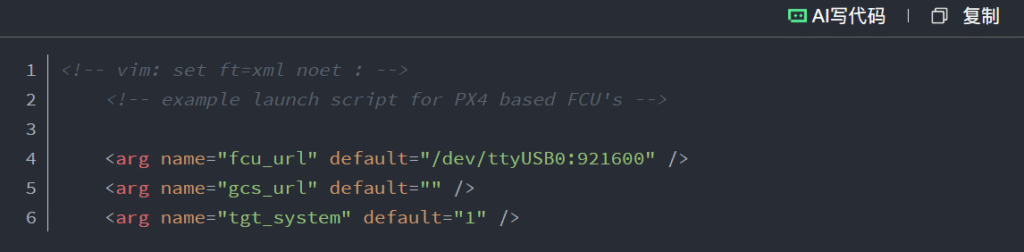
5. Modify the startup file configuration: Use “sudo gedit apm.launch” to open the file and modify the corresponding port and baud rate. Check if the serial port is the one just found. If not, please modify the serial port Settings and change the baud rate to 921600 at the same time.
(<arg name=”fcu_url” default=”/dev/ ttyTHS1:921600″ />)
After modification, it is as shown in the following figure
6. Grant serial port permission: Run “sudo chmod 777 /dev/ ttyTHS1” (modify according to the actual serial port name) to grant serial port usage permission.
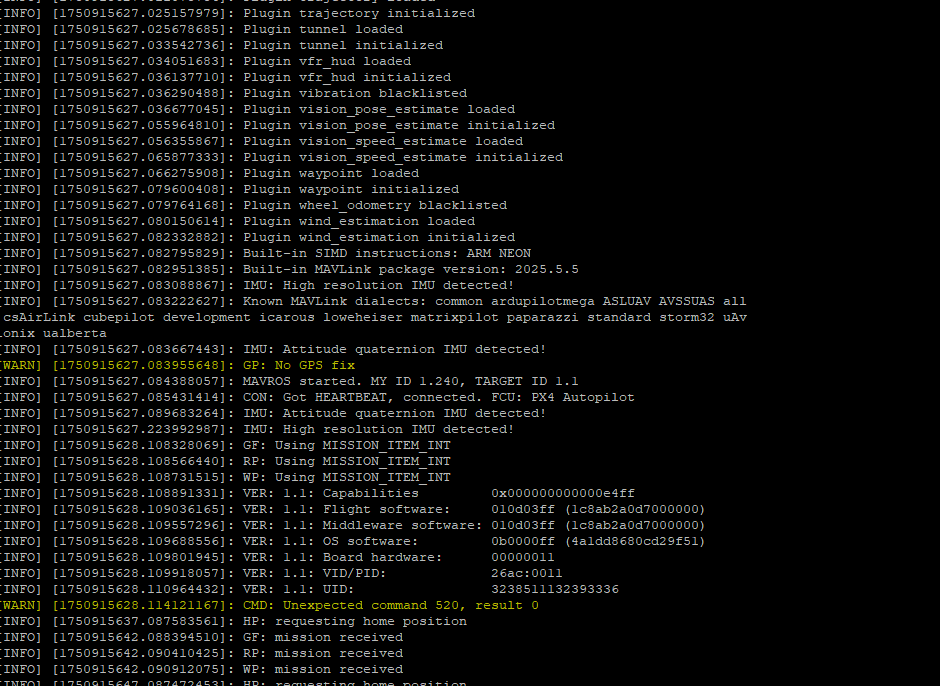

7. Start mavros: Run “roslaunch mavros apm.launch fcu_url:=” /dev/ttyTHS1:921600″ (modify according to the actual serial port name). If mavros runs successfully, it indicates a successful connection. The link has been established.
crwxrwxrwx 1 dial-out 188, 0 Jun 29 09:22 /dev/ttyTHS1
How to permanently grant the highest privileges to the /dev/ttyTHS1 port:

1.Create a rule file
2. Add rules (grant read and write permissions to all users) :
KERNEL==”tty ttyTHS1″, MODE=”0666″
If it is necessary to adapt to all USB serial port devices (such as ttyUSB0, ttyUSB1, etc.), the following changes can be made
KERNEL==”ttyUSB[0-9]*”, MODE=”0666″
3. Save and exit (press Ctrl+X, type Y, and then press Enter).
4. Apply udev rules
Restart the udev service to make the rules take effect:
sudo udevadm control –reload-rules
sudo udevadm trigger
Supplementary Explanation
-MODE = “0666” indicates that all users have read and write permissions. If it is necessary to restrict permissions, you can change it to 0660 (only users within the group have read and write permissions). At this point, it is necessary to ensure that the user belongs to the dial-up group.
If the device name is ttyACM0 (for example, an Arduino device), the KERNEL in the rule needs to be changed to KERNEL==”ttyACM0″ or KERNEL==”ttyACM[0-9]*”.
After completion, you can plug or unplug the USB device, or execute “ls -l /dev/tty tty ths1” to confirm whether the permission has been changed to “crw -RW -RW -” (corresponding to 0666).
After setting it up in this way, /dev/tty ttyTHS1 will permanently have the highest operation permissions, and there is no need to execute the sudo command each time it is used. How does ROS communicate with unmanned ships: Link between MAVROS and Pixhawk
Through MAVROS, a communication link has been established between ROS and the Pixhawk flight control system, providing a technical foundation for advanced functions such as autonomous navigation and environmental perception of unmanned ships. From the physical layer of hardware connection, to the link layer of the MAVLink protocol, and then to the level of ROS application, the precise configuration of each layer is the key to achieving stable communication. As the application scenarios of unmanned ships expand (such as water quality monitoring, underwater concealed pipeline detection, etc.), this communication solution will continue to provide core support for the intelligent upgrade of unmanned ships.